
A graphics card—often called a GPU (Graphics Processing Unit) or video card—is a computer part that handles everything you see on your screen. It’s responsible for creating images, videos, and animations, whether you’re playing games, editing videos, designing graphics, or just watching YouTube or scrolling the web. Basically, if it involves visuals, the graphics card is doing a lot of the work behind the scenes.
What Is a Graphics Card?
A graphics card is a piece of hardware that processes visual information and sends it to your monitor. Every computer needs some way to display graphics, but not all systems do it the same way. Some computers use integrated graphics, which are built directly into the CPU. These work fine for basic tasks. A dedicated graphics card, however, is a separate component with its own processor and memory, which allows it to handle much more demanding workloads.
Most graphics cards are made up of a few key parts:
GPU (Graphics Processing Unit): This is the core of the graphics card. It handles the complex math needed to create images and motion.
VRAM (Video Random Access Memory): This special memory stores textures, images, and frame data so the GPU can access them quickly.
Cooling System: Fans or heat sinks keep the card from overheating while it’s working hard.
Output Ports: Ports like HDMI or DisplayPort connect the graphics card to a monitor.
Why Graphics Cards Matter
Graphics cards are built to perform many calculations at the same time. This makes them especially good at rendering detailed visuals and handling tasks that need parallel processing. Without a graphics card, modern games and graphic-heavy programs would struggle to run smoothly, or might not run at all. Offloading this work from the CPU also helps the entire system perform better.
How a Graphics Card Works
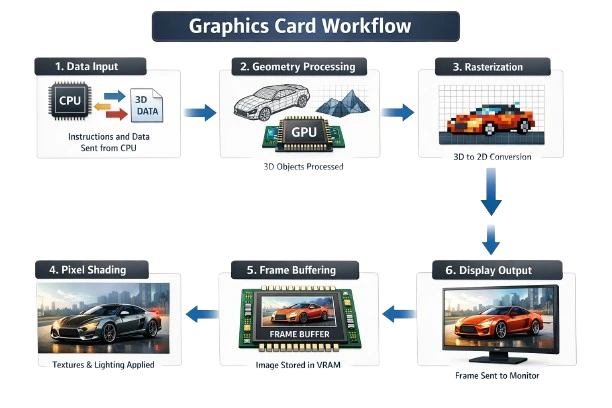
Even though everything happens incredibly fast, the graphics card follows a clear process to create each image you see on your screen.
1. Receiving Data
First, the CPU sends instructions to the graphics card. This includes information like object shapes, positions, colors, and textures—basically what needs to appear on the screen.
2. Geometry Processing
Next, the GPU processes this data by breaking 3D models into simpler shapes such as points and lines. It figures out where objects are located and how they’re oriented in a virtual 3D space.
3. Rasterization
The GPU then converts these 3D shapes into a 2D image made up of pixels. This step determines which pixels on the screen will represent each object.
4. Pixel (Fragment) Shading
Once the pixels are mapped out, the GPU assigns each one color, brightness, texture, and lighting effects. This is where details like shadows, reflections, and depth are added to make the image look realistic.
5. Frame Buffering
The finished image, called a frame, is temporarily stored in the graphics card’s VRAM. This helps prevent flickering and keeps motion smooth.
6. Display Output
Finally, the graphics card sends the completed frame to the monitor through an output port. This cycle repeats dozens or even hundreds of times per second, which is what creates smooth animation and motion.
Conclusion
A graphics card is an essential part of modern computers, turning raw data into the visuals we see and interact with every day. By handling complex graphical tasks separately from the CPU, it boosts performance and allows for better-looking graphics. Understanding how a graphics card works makes it easier to see why it’s so important for gaming, creative work, and everyday computer use.