
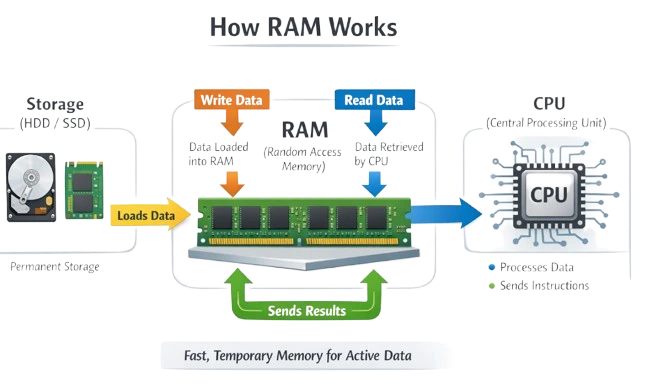
Start writing hGetting RAM: Your Computer's Quick-Notes Scratchpad
Kicking Things Off
RAM is one of those parts in a computer that just makes everything run smoother, you know? It stands for Random Access Memory, and basically, it's this super-fast spot where the computer stashes stuff the CPU needs right away. Without it, your machine would crawl.
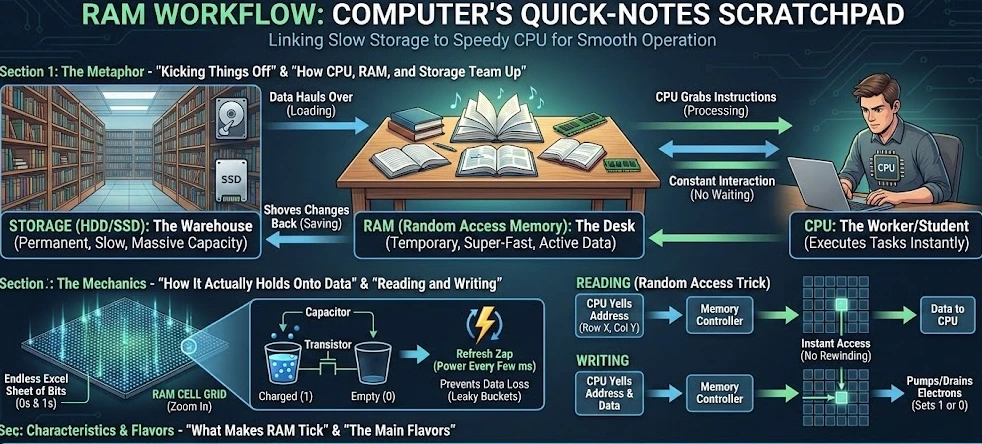
Picture this: you're at the library cramming for exams. All those endless shelves of books? That's your hard drive, crammed with everything but slow to dig through. Your desk is the RAM. You—the CPU—grab the books you need now, spread 'em out, and flip pages without trekking back every two seconds. Bigger desk means more books open at once, no constant interruptions.
How It Actually Holds Onto Data
Zoom in close, and RAM's this massive grid of tiny cells, like an endless Excel sheet. Each one holds a single bit—just a 0 or 1, the tiniest chunk of info.
Most of it's DRAM, which pairs up capacitors and transistors. The capacitor's like a mini bucket: full of electrons? That's a 1. Empty? A 0. The transistor's the gate, letting the computer check it or dump in fresh electrons.
Problem is, those buckets leak. So the computer zaps 'em with power every few milliseconds to keep the data from vanishing. Nonstop hustle.
How CPU, RAM, and Storage Team Up
Let's break down the main players: storage (HDD or SSD), RAM, and the CPU.
Storage is the big warehouse—OS, pics, files, all parked there forever. Holds tons, but it's pokey.
RAM's the loading zone. Fire up Chrome? Data hauls over from storage to RAM fast—that's your loading spinner.
CPU's the worker bee, pulling instructions straight from RAM. No waiting around, so your cursor glides and games don't stutter.
Save something? It flips: CPU shoves changes from RAM back to storage.
Reading and Writing: The Random Access Trick
"Random access" means it grabs any spot instantly—no rewinding like old tapes where song five meant skipping one through four.
Picking the Spot: CPU yells an address to the memory controller—row X, column Y.
Reading It: Controller flips the switches. Transistor opens, checks the bucket. Charge? 1. Nada? 0. Boom, data to CPU.
Writing It: Same spot, but now it pumps electrons in for 1 or drains for 0.
What Makes RAM Tick
It Forgets Everything: Volatile as heck—cut power, and poof, capacitors dump. Save that essay, dude.
Blazing Speed: SSDs hit maybe 7GB/s tops; RAM? 20-50GB/s easy. Matches the CPU's billion-per-second grind.
Size Matters: 8-32GB usual now. Tiny next to terabyte drives, but hey, it only juggles what's active.
The Main Flavors
DRAM: Cheap, dense, needs those refresh zaps. Powers your whole system.
SRAM: No refreshing, zippy with flip-flop circuits. Pricey and bulky, so it's for CPU's super-small caches (L1, L2, L3).
Wrapping It Up
RAM's that quiet MVP linking slow storage to speedy CPU. It lets you tab between apps, crush games, cut videos without hiccups. Speed's not just CPU muscle—it's grabbing data when you need it, no delays.